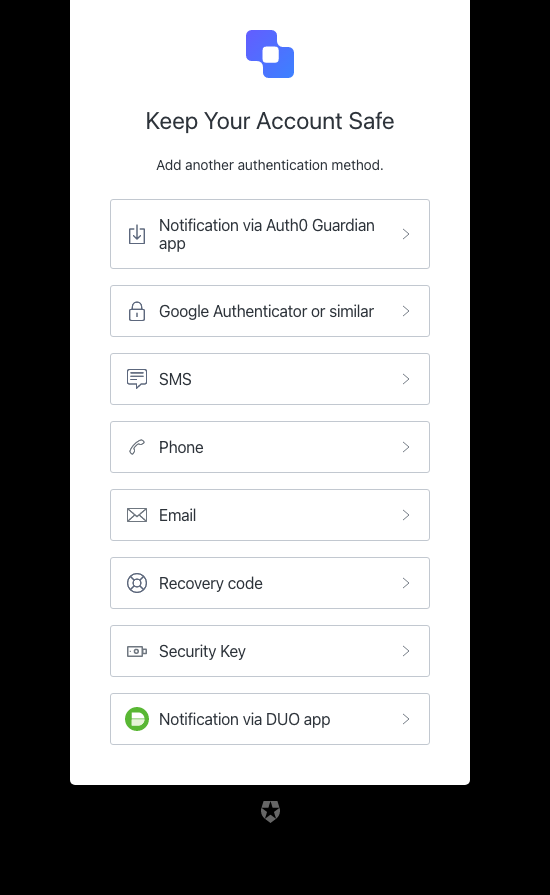
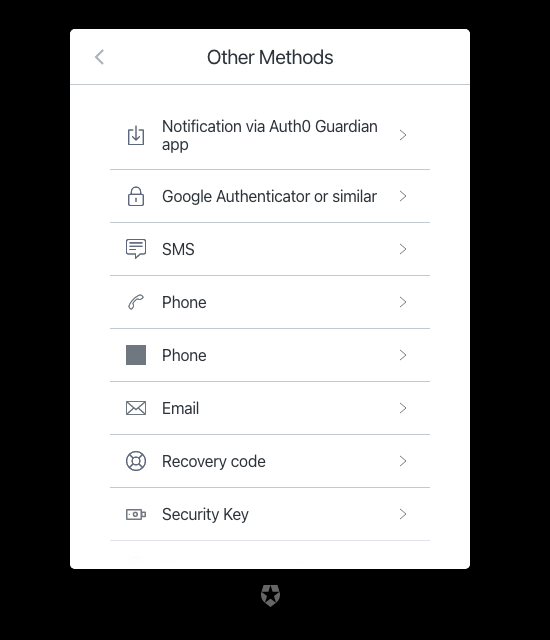
We are using universal login and have our own branding theme. But I noticed that the theme is applied to most pages such as mfa-begin-enroll-options, but it’s not applied on mfa-login-options page. How can I apply the branding theme on that page. In my test, the issue only happens on that page.
I cannot embed images but these are links to Auth0 help doc,
mfa-begin-enroll-options: https://cdn2.auth0.com/docs/1.14516.0/media/articles/universal-login/text-customization/mfa-begin-enroll-options.png
mfa-login-options: https://cdn2.auth0.com/docs/1.14516.0/media/articles/universal-login/text-customization/mfa-login-options.png
Hi @ming.jiang
Welcome to the Auth0 Community!
As a first step, I would recommend navigating in your Auth0 Dashboard to Branding → Universal Login → Customize authentication screens and search for " mfa-login-options ". You can ensure that it’s rendering mode is set to Standard Mode in order to use the Universal Login Theme screen, or if you are using a Custom Domain and custom page templates, select Advanced Mode and check " Use custom page template ". In addition, you can verify what rendering mode does mfa-begin-enroll-options have and match it for mfa-login-options.
The following documentations might prove useful in helping you further with the issue:
Let me know if this helped clear the issue!
Best regards,
Gerald
Hi @gerald.czifra , I did check those already. And both pages are using Standard mode. Also I think this is not specific to my org. The screen shots are from Auth0 official help doc, and you can see the branding is not applied to mfa-login-options but is applied to mfa-begin-enroll-options page
Hi @ming.jiang
Thank you for confirming this!
After doing some research, this appears to currently be a limitation of the Universal Login page templates, where some of them may not fully inherit your tenant’s branding settings, such as the mfa-login-options screen in quesition.
This has been reported and is currently in works, while we do not have an ETA for it’s resolution. What we can recommend is exploring our Advanced Customization for Universal Login (ACUL) feature. This ties well with my previous message and your observation of the mfa-login-options screen being in Standard render mode, you can customize the screen from there separately and test if it renders as expected → I can suggest the Configure ACUL documentation to assist with the process.
Looking forward to your input, let me know if our ACUL feature has solved the issue.
Wishing you a Merry Christmas!
Gerald